
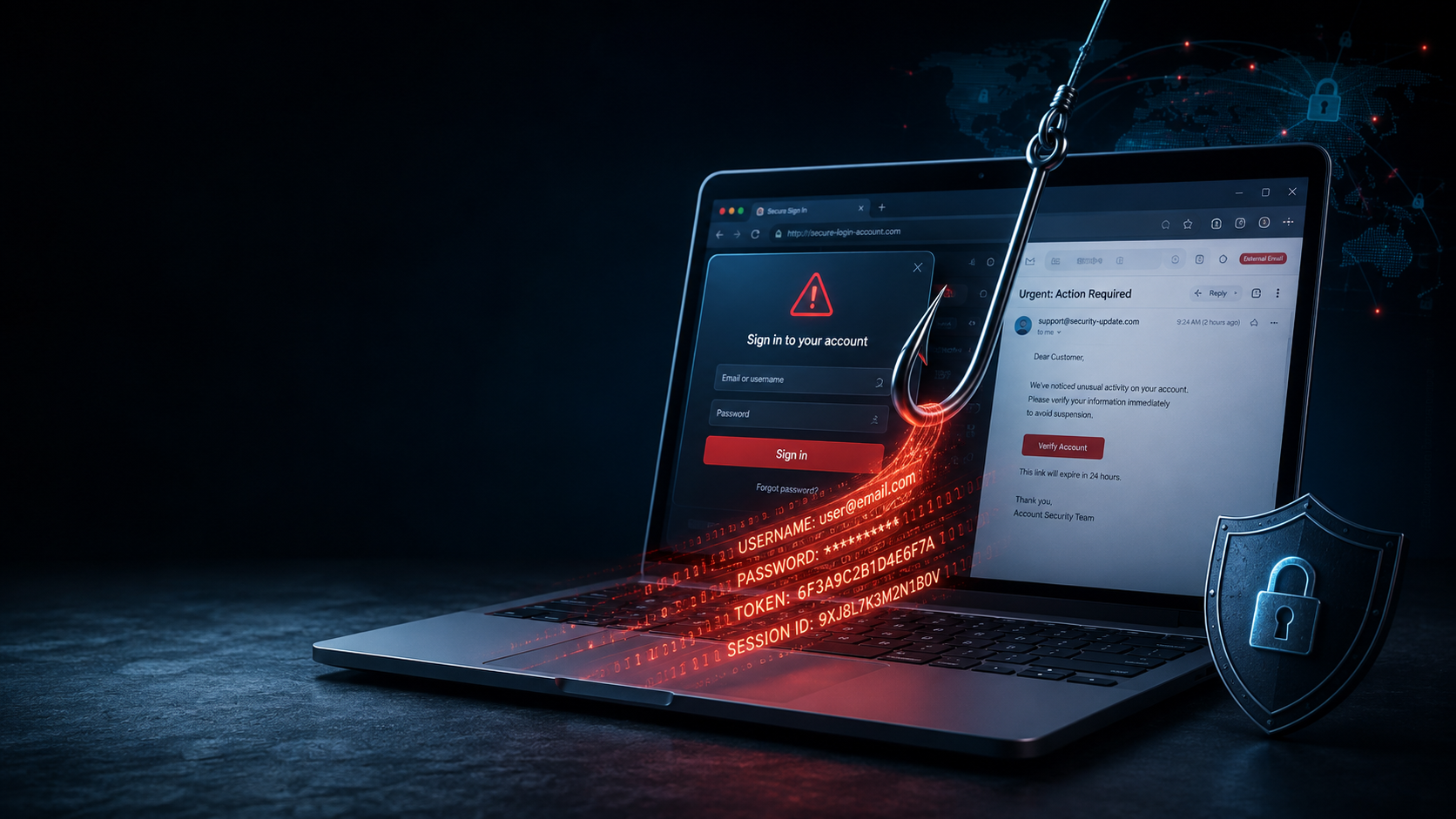
Phishing is a type of cyberattack where scammers impersonate trusted companies, organizations, or people to trick you into revealing passwords, financial information, or other sensitive data. Imagine checking your email and seeing a message from your bank. The logo looks right, the formatting is flawless, and the urgency feels real: “Your account has been compromised. Click here to verify your identity immediately.”
Your heart races. You click the link. You enter your credentials. And just like that, you’ve handed the keys to your digital life to a stranger halfway across the world.
What is phishing? At its core, it’s a social engineering attack where cybercriminals impersonate trusted people or organizations to trick you into revealing sensitive information, transferring money, or downloading malware. The name is fitting—attackers cast a line with deceptive bait and wait for someone to bite.
But here’s what most articles won’t tell you: phishing isn’t just getting smarter. It’s getting personal. And that’s what makes it so terrifying.
How Does a Phishing Attack Work?
Most phishing attacks follow a surprisingly simple pattern.
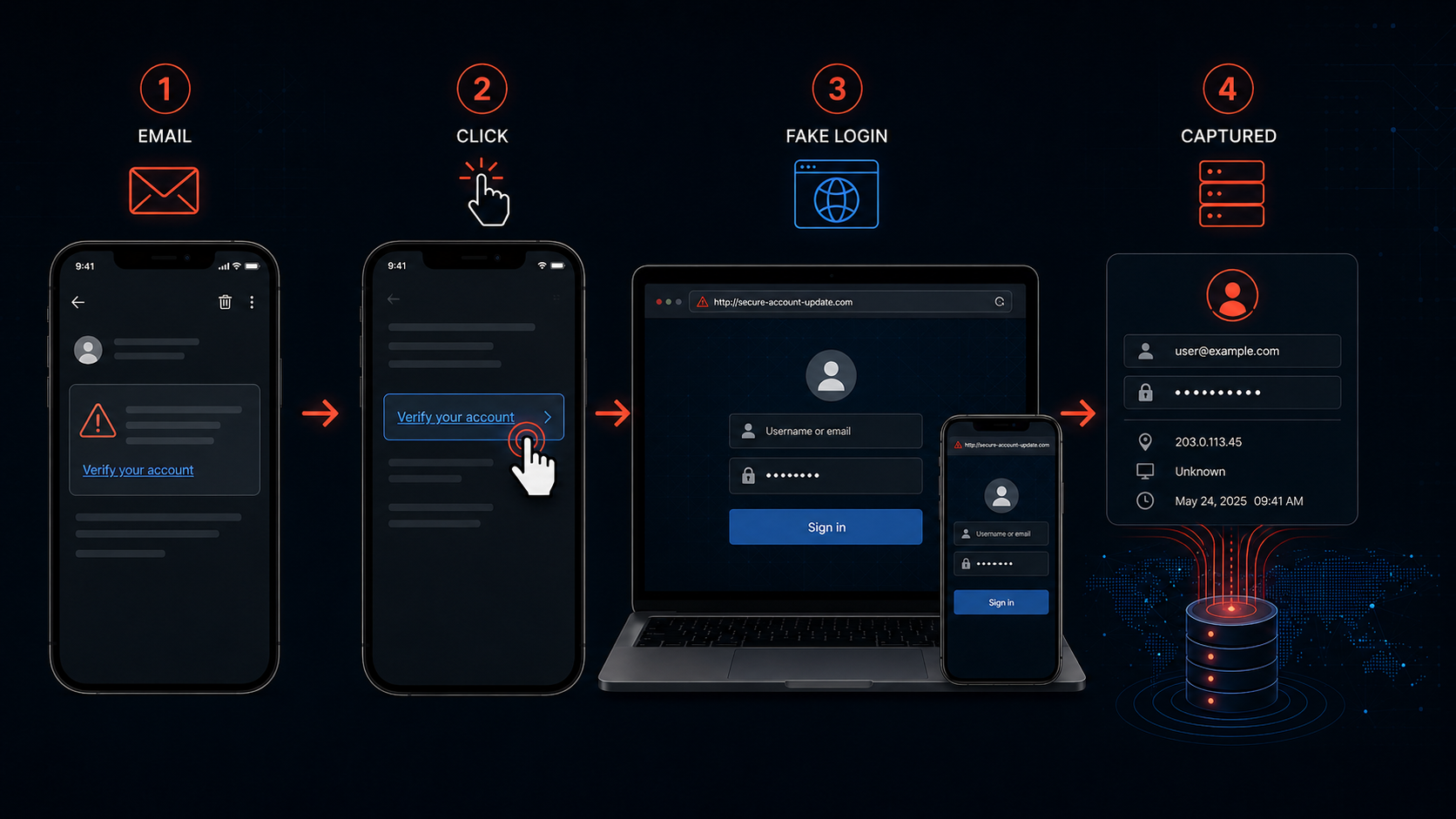
1. The attacker creates a believable story
First, the attacker decides who they want to impersonate.
It could be your bank, employer, delivery company, or even someone you know.
The message might claim:
- There is suspicious activity on your account.
- Your payment failed.
- Your package couldn’t be delivered.
- Your password needs to be reset.
- You’ve won something.
- You need to verify your identity.
2. The attacker creates pressure
This is where psychology becomes important.
Instead of giving you time to investigate, the message encourages immediate action.
Words such as urgent, suspended, final warning, security alert, verify now, and payment failed are commonly used to create pressure.
3. You are given an action
The attacker wants you to do something.
Usually, that’s:
- Click a link
- Open an attachment
- Enter your username and password
- Share an OTP or verification code
- Download an application
- Call a phone number
- Transfer money
4. The attacker gets what they wanted
If you enter your credentials on a fake website, the attacker may receive them.
If you download malicious software, the attacker may gain another way into your device.
And if you send money directly, recovering it can be extremely difficult.
That’s why phishing isn’t really about technology versus technology.
It’s often about a criminal trying to influence a person’s decision.
Why Is Phishing So Effective?
You might think, “I would never fall for something that obvious.”
That’s exactly why modern phishing deserves attention.
A phishing message doesn’t necessarily need to be poorly written or obviously fake.
Attackers can copy logos, imitate legitimate websites, use convincing language, and tailor messages to particular victims.
Verizon’s 2026 DBIR says email remains the preferred attack vector for many social-engineering breaches, while attackers are increasingly targeting mobile devices and unconventional channels.
The biggest weakness isn’t necessarily technical.
It’s trust.
If a message appears to come from someone you already trust, you’re much more likely to follow its instructions.
Common Types of Phishing
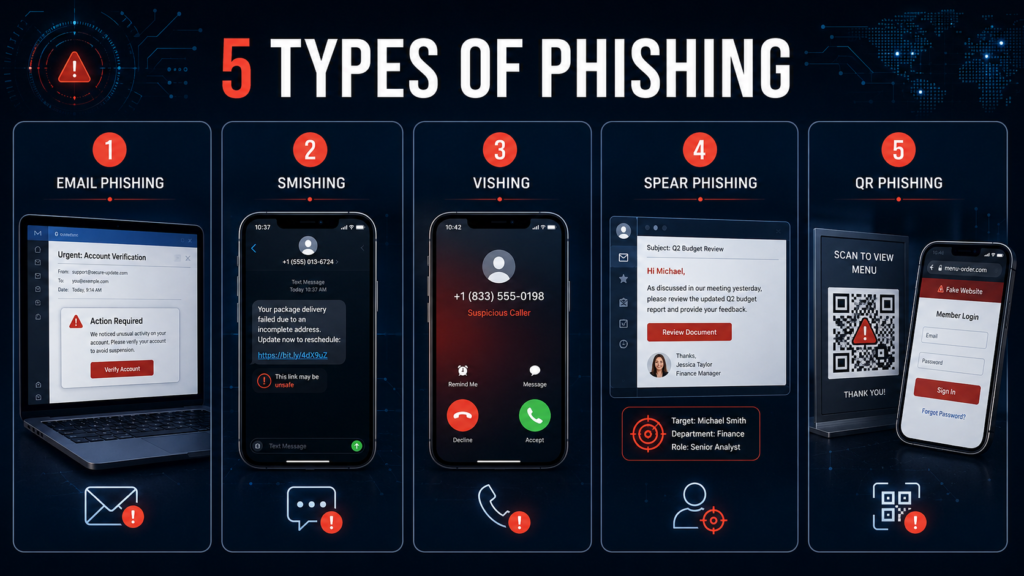
Phishing comes in several forms. The basic idea remains the same, but the communication method changes.
| Type | Where it happens | Typical example |
|---|---|---|
| Email phishing | Fake bank security alert | |
| Smishing | SMS/text | Fake delivery notification |
| Vishing | Phone calls | Fake bank representative |
| Spear phishing | Targeted messages | Fake message aimed at an employee |
| Whaling | Executives/important targets | Fake CEO payment request |
| Social media phishing | Social platforms | Fake verification message |
| QR phishing | QR codes | QR code leading to fake login page |
Email Phishing
This is the classic form.
You receive an email that appears to come from a legitimate organization and are encouraged to click a link or open an attachment.
For example:
Subject: Your account requires immediate verification
Message:
“Unusual activity has been detected. Click below to confirm your identity.”
The link may lead to a fake login page designed to steal your credentials.
Smishing
Smishing is phishing through SMS or messaging services.
Imagine receiving:
“Your package could not be delivered. Confirm your address here.”
You weren’t expecting a package, but you might still click the link out of curiosity.
The FTC has specifically warned consumers about phishing through unexpected messages and recommends avoiding links or attachments in messages you weren’t expecting.
Vishing
Vishing, or voice phishing, happens over phone calls.
The attacker may pretend to be:
- A bank employee
- Technical support
- A government official
- A delivery company
- Your employer
The caller may ask you to provide sensitive information or perform an action.
A major warning sign is a caller demanding immediate action while discouraging you from independently verifying their identity.
Spear Phishing
Regular phishing often targets many people at once.
Spear phishing is more targeted.
An attacker may research their victim first and create a message specifically designed for that person.
For example, an employee might receive a message apparently from their manager:
“I’m in a meeting. Please purchase these gift cards and send me the codes.”
Because the message appears personalized, the victim may be more likely to trust it.
QR Phishing (Quishing)
QR phishing, sometimes called quishing, uses malicious QR codes to trick people into visiting fake websites or revealing sensitive information.
Instead of sending you a suspicious-looking link, an attacker may place a QR code in an email, text message, poster, parking notice, or other location. When scanned, the code can direct you to a fraudulent login or payment page designed to look legitimate.
For example, you might scan a QR code claiming:
“Scan to verify your account.”
The page that opens may imitate a trusted service and ask for your email address, password, payment information, or other sensitive details.
QR codes can be particularly deceptive because you can’t immediately see the destination URL just by looking at the code.
To stay safer, check the web address your phone displays before opening a QR-code link, and avoid entering sensitive information if the page or request seems unexpected.
Superastik tip: If a QR code asks you to log in to an important account, consider opening that company’s official app or website yourself instead of continuing through the QR code.
That fixes the gap and makes the “Common Types of Phishing” section consistent with the table and infographic.
Phishing vs. Malware vs. Scams
These terms are often confused.
| Threat | Main idea |
|---|---|
| Phishing | Tricks you into taking an action or revealing information |
| Malware | Malicious software designed to damage, spy on, disrupt, or gain access |
| Scam | A broader category of deception intended to steal money, information, or something valuable |
| Social engineering | Manipulating people into performing actions that benefit the attacker |
Phishing can actually be used to deliver malware.
For example:
Phishing email → malicious attachment → malware installed
Or:
Phishing message → fake login page → password stolen
So phishing isn’t necessarily the final attack.
Sometimes it’s simply the door the attacker uses to get inside.
How to Recognize a Phishing Message
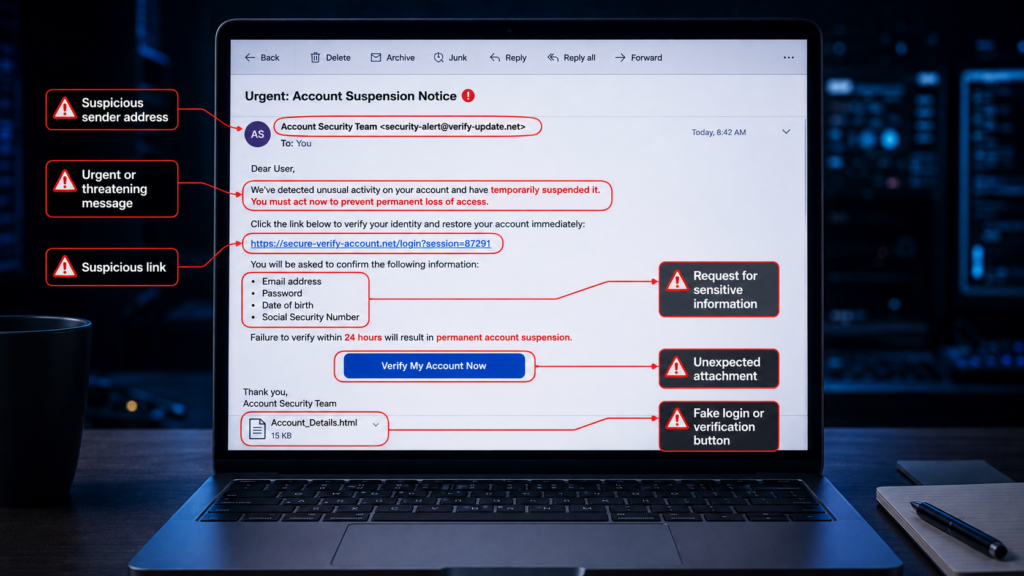
There isn’t one perfect sign.
Instead, look for a combination of warning signals.
1. Unexpected urgency
Be suspicious when a message says you must act immediately.
2. Strange links
Don’t trust a link simply because the message contains a familiar company logo.
Hover over links on a computer and inspect where they actually lead.
3. Requests for sensitive information
Be especially careful when an unexpected message asks for:
- Passwords
- OTPs
- Banking information
- Credit/debit card details
- Recovery codes
- Personal identification information
4. Unexpected attachments
Don’t open attachments simply because the email looks professional.
5. The message doesn’t make sense
Ask yourself:
Was I actually expecting this?
If you never ordered a package, why are you being asked to confirm its delivery?
If you don’t have an account with the company, why are they asking you to reset its password?
That simple question can stop many attacks.
The Most Important Rule: Don’t Let the Message Control Your Next Move
This is perhaps the most useful phishing-defense technique.
Don’t investigate a suspicious message by using the message itself.
Suppose you receive a message claiming that your bank account has a problem.
Don’t click its link.
Instead, open your bank’s official app or manually enter the bank’s known website address.
If there really is a problem, you should be able to see it there.
The FTC similarly recommends contacting companies through a phone number, email address, or website you already know to be legitimate rather than using contact information provided in a suspicious message.
How to Protect Yourself From Phishing
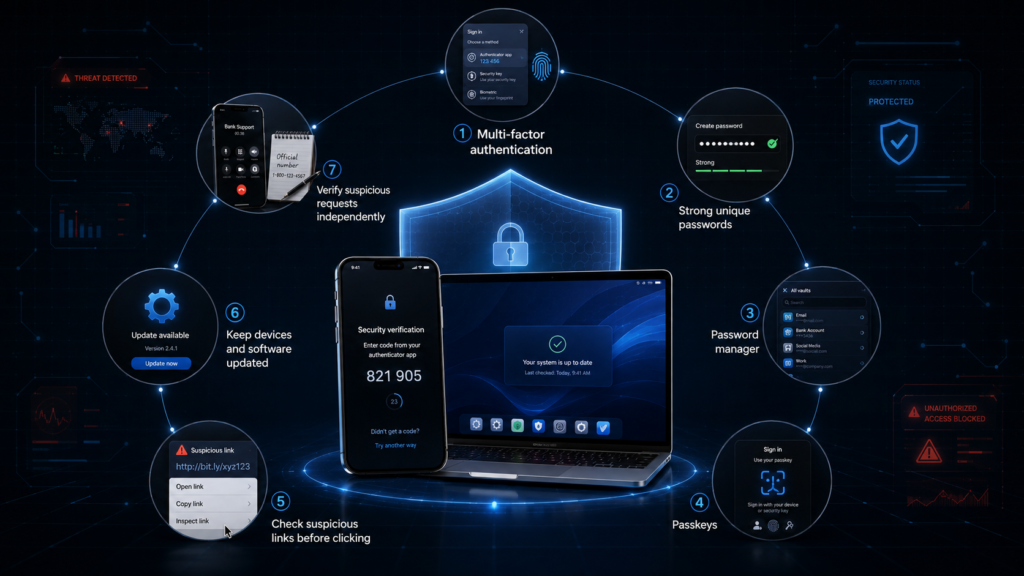
No single security feature can eliminate phishing, but several layers make an enormous difference.
Use Multi-Factor Authentication
MFA adds another verification step beyond your password.
This means that even if someone steals your password, they may still be unable to access your account.
The FTC recommends two-factor authentication as an additional layer of protection against phishing-related account compromise.
Use a Password Manager
A password manager can help you create and use unique passwords for different websites.
That matters because if one password is stolen, attackers shouldn’t be able to use the same password to access your other accounts.
Consider Passkeys
Passkeys are another important development in account security.
Unlike traditional passwords, passkeys are designed to be phishing-resistant because authentication is tied to your device and the legitimate website or service. Google describes passkeys as phishing-resistant and says they rely on a fingerprint, face scan, or PIN rather than a traditional password.
Keep Your Devices Updated
Operating-system and browser updates frequently include security fixes.
Don’t ignore them indefinitely.
Slow Down
This might be the simplest security advice of all.
If a message makes you panic, pause.
Take 30 seconds.
Open the official app.
Check the account yourself.
Call the organization using a number you know is legitimate.
A few seconds of hesitation can be more valuable than trying to become an expert at spotting every fake email.
What Should You Do If You Clicked a Phishing Link?
Don’t panic.
The consequences depend on what happened after you clicked.
If you clicked but entered nothing
Close the page and avoid interacting with it further.
If anything downloaded automatically, scan your device with reputable security software.
If you entered your password
Change the password immediately from the legitimate website.
If you reused that password anywhere else, change it there too.
If you entered financial information
Contact your bank or financial institution through its official contact channels as soon as possible.
If you gave away an OTP or authentication code
Treat the situation seriously and secure the affected account immediately.
Check for unauthorized account activity and change your authentication credentials where appropriate.
The FTC also recommends taking specific recovery steps depending on what information was exposed.
Phishing Is Evolving
One of the biggest misconceptions about phishing is that it is simply a problem of badly written emails.
That’s becoming less true.
Attackers are using more convincing messages and expanding beyond traditional email.
Verizon’s 2026 DBIR reports that attackers are increasingly moving toward mobile-centric social engineering, including text messages and voice-based attacks.
This means the question isn’t simply:
“Does this email look fake?”
A better question is:
“Is this request legitimate, and can I verify it independently?”
That’s a much more powerful habit.
Final Thoughts: What Is Phishing Really About?
So, what is phishing?
At its core, phishing is deception used to make you give an attacker something valuable—your password, financial information, personal data, access to an account, or even control of your device.
The technology behind an attack can change.
The message can change.
The platform can change.
But the psychological trick often remains the same:
Make you trust the attacker, create pressure, and get you to act before you think.
That’s why the best defense isn’t simply memorizing what a phishing email looks like.
It’s developing a habit of verification.
When something feels urgent, slow down.
When a message asks for sensitive information, verify it independently.
And when you’re unsure, don’t click first and investigate later.
Investigate first. Click later.
Stay Safe Online
Have you ever received a suspicious email, text message, or phone call that looked completely legitimate?
Share your experience with us, and check out more cybersecurity and technology guides on Superastik to learn how to stay safer online.